Books
Setting up Numen Books
A required 3-step wizard — company info, opening balance sheet, and start — that gets your books ready before you record a single entry.
Before you can use any Books agent, Numen walks you through a short, one-time onboarding. It takes a few minutes and makes sure your ledger starts from a known, balanced state. You only do it once per entity.
Note
Onboarding is a gate: the Books modules stay locked until all three steps are done. That's deliberate — an ERP with no opening balances would produce misleading statements.
What you can do
- Register your company information with fields that adapt to your country (business registration, tax IDs, currency, fiscal year).
- Enter your opening balance sheet so assets, liabilities, and equity carry into Numen.
- Start Books and unlock every agent — Accounting, Sales, Purchase, Production, HR, and Reporting.
- Re-open your company info and opening balances any time from the Company Info panel.
How to complete onboarding
- 1Step 1 — Company info. Pick your country first; the form then shows the right fields for it. Fill in your legal name, registration number, tax IDs, base currency, and fiscal year start.
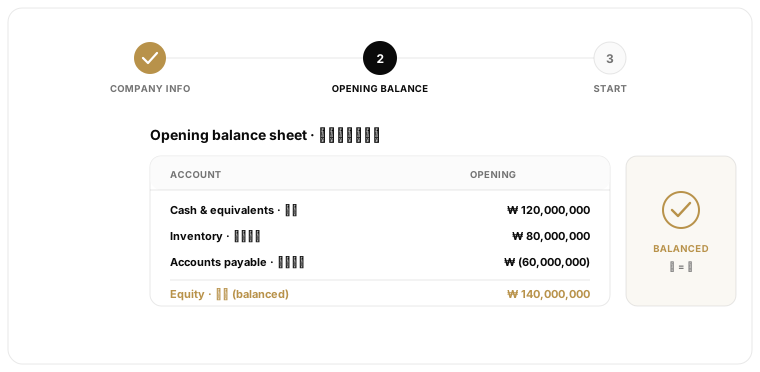
- 2Step 2 — Opening balance sheet. Enter the closing balances from your previous system as of the day before you go live. Numen keeps the two-column debit/credit layout, so total assets must equal liabilities plus equity before you can continue.
- 3Step 3 — Start. Review the summary and confirm. Books unlocks and your opening balances become the first entry in every ledger.
Why the opening balance matters
Your books don't begin at zero — you already have cash, receivables, inventory, loans, and retained earnings. The opening balance sheet tells Numen where you stand on day one. Without it, the trial balance would be wrong, your first close wouldn't reconcile, and every report would understate the business. Enter it carefully and confirm it balances.
Tip
Not sure of an exact figure yet? Enter your best estimate to unlock Books, then re-open the opening balances later and correct it. Refining one number later is easier than waiting on a locked module.
Next steps
Accounting
Start recording journal entries and build your trial balance.
Coming soonMaster data & registries
Set up the accounts, customers, and items Books runs on.
Coming soonPlan vs. Books
Understand when to use the planning module and when to use ERP.
Was this article helpful?